
What a birth chart online actually shows
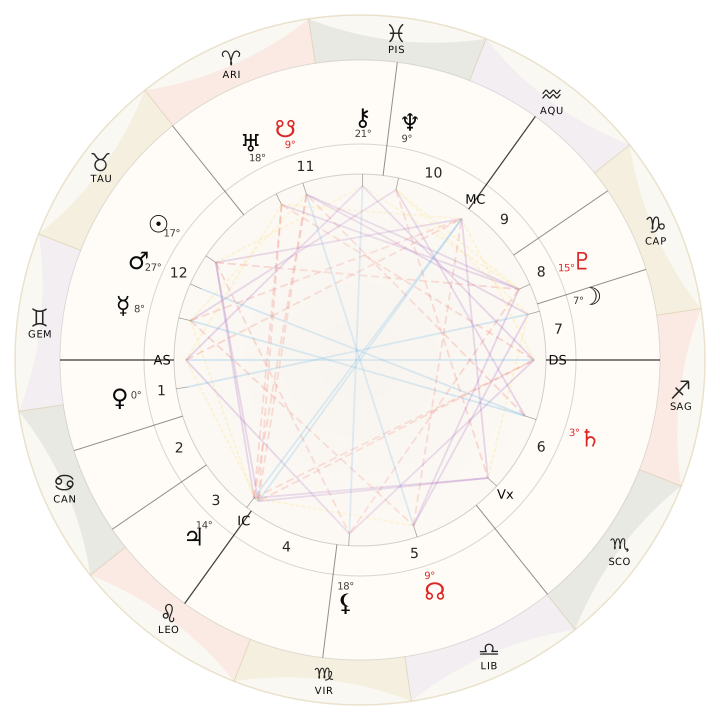
A birth chart online is a map of the sky at the moment and place you were born—calculated in the browser from the details you enter above. Popular horoscope columns usually stop at your Sun. An online natal map goes further: it places the Sun, Moon, Mercury, Venus, Mars, and the outer planets in zodiac placements, notes the Ascendant on the eastern horizon, and divides the sky into houses that describe life topics such as work, relationships, and home.
Use the form to create a birth chart online with your date, time, and place. Positions come from astronomical calculation—not a generic Sun blurb. This page is built so you can make your chart and inspect the wheel without a bait-and-switch paywall at the start.
Online natal map vs Sun horoscope vs paid report
Use this compare table to set expectations before you calculate:
| Option | What you get | Birth data needed | Best for |
|---|---|---|---|
| Birth chart online | Planets, Ascendant, houses, wheel/tables | Date, time, place | Creating your full sky map |
| Sun horoscope | One placement based on birth date band | Date only | Entertainment / broad themes |
| Paid report | Longer narrative synthesis on top of the map | Same timed data | Guided storytelling after you verify placements |
A useful online map should show placements you can verify. Paid reports—when you choose them later—add narrative; they should not replace the raw geometry.
Birth chart by date of birth—and why time and place still matter
Many people search for a birth chart by date of birth first. The Sun’s placement changes about monthly, so a calendar date alone can produce a Sun result. A complete online natal calculator also needs time and place: the Moon changes roughly every two and a half days, the Ascendant about every two hours, and house cusps depend on geographic coordinates.
If your clock time is listed on a hospital record or certificate, use that time. If you only know “morning” or “after dinner,” treat Ascendant and house-based statements as provisional. Any map is only as precise as the data you feed it. Selecting a city from the place suggestions sets latitude and longitude so the calculation is not guessing your location from a free-text string alone.
Timezone handling is another reason online tools help. Historical timezone rules, daylight saving changes, and border quirks are easy to miss when someone tries to convert local time to universal time by hand. A well-built calculator applies those corrections once coordinates and local civil time are known.
How to get (and make) your birth chart online
To create a birth chart online here:
- Enter your date carefully (year included).
- Enter time as precisely as you can.
- Search and select your place from the suggestions so lat/lng are set.
- Submit to run the calculation and open your wheel and placement tables.
That is how to make a natal map without installing desktop software. If you are comparing tools later, keep the house system and zodiac type constant so differences reflect data—not settings.
What the chart wheel is showing
A natal chart wheel is a circular display of the zodiac and the house structure—the same style as the sample preview above (sample style).
The zodiac is represented as a 360-degree circle divided into twelve 30-degree sectors: Aries through Pisces. This framework is a coordinate convention. It is different from the modern astronomical constellations, whose boundaries and sizes are uneven.
A placement such as “Venus at 18° Gemini” is calculated from a celestial longitude and then expressed as:
- Sign: the 30-degree sector containing that longitude
- Degree within the sign: the placement’s position from 0° to 29°
- House: the area containing the placement under the chosen house system
- Retrograde status: whether the body appears to be moving backward from Earth’s perspective at that moment, where applicable
The wheel also connects placements that form aspects. Those lines represent angular relationships between factors. Placement tables and aspect lists sit beside the wheel so you can inspect the geometry rather than relying only on a written summary.
How to read your online chart without getting lost
New readers often open a chart wheel packed with glyphs and freeze. Start with three anchors—the Big Three:
- Sun — themes of vitality, purpose, and conscious identity.
- Moon — emotional habits, comfort needs, and private reactions. If you later want a deeper lunar focus, what’s my moon sign walks that path specifically.
- Ascendant — the style through which you meet the world and the placement that sets the house structure. For a rising-only deep dive, see what’s my rising sign.
After the Big Three, skim personal planets: Mercury for communication style, Venus for attraction and values, Mars for drive and conflict. Then notice whether several planets cluster in one sector or house—that concentration often explains why one life theme feels louder than the Sun alone suggests.
Aspects (angles between planets) add the “how.” A harmonious aspect between Venus and Jupiter reads differently from a tense square between Mars and Saturn. You do not need to memorize orbs on day one; notice repeating patterns first, then refine.
Houses answer “where in life.” The second house is often linked with resources, the seventh with one-to-one partnerships, the tenth with vocation and visibility. Whole-sign and quadrant house systems can shift cusp degrees; this calculator defaults to a standard modern setting (Placidus) so beginners get a consistent first map. If you are comparing software later, keep the house system constant so you are not confusing system differences with input errors.
Free online chart access versus paid reports
A good free online natal chart should show placements you can verify: planet lists, a wheel or table, and enough context to orient yourself. Paid reports—when you choose them—usually add long-form narrative synthesis, editing, or specialized themes such as relationships or career. Neither replaces critical thinking. Interpretation is subjective. Two skilled readers can emphasize different threads in the same map without either “breaking” the math.
Be wary of pages that promise a free online chart and then withhold every useful glyph behind an email wall with no calculation. Here, calculation uses the details you enter, so you can see the wheel and placement tables without a bait-and-switch.
Western tropical framing
This birth chart online tool uses a Western tropical zodiac by default—the same convention most English beginner tools use. Vedic (sidereal) maps shift placements relative to tropical results. Know which zodiac you are viewing before comparing to a friend’s “different” chart or to a Vedic kundali reading.
Common mistakes when creating your first online chart
Using today’s date by accident. Double-check year and day, especially on mobile date pickers.
Skipping place selection. Typing a city name without choosing a suggestion may leave coordinates empty. The form asks you to pick from the list so latitude and longitude are set.
Assuming daylight saving incorrectly. Let the calculator handle civil time; do not “fix” the clock yourself unless you are certain.
Reading only the Sun. Ignoring Moon and Ascendant wastes the data you just entered. Spend five minutes on those two before closing the tab.
Mixing tropical and sidereal without noticing. Most Western beginner tools use the tropical zodiac. Sidereal maps shift placements. Know which zodiac you are viewing before comparing results.
How this page fits a fuller toolkit
Some people only need the whole natal map. Others arrive with a narrower question. If your primary curiosity is the Ascendant, a dedicated rising tool can feel clearer. If emotions and habits are the puzzle, a moon calculator may be the better first click. If you are exploring nodal themes and past-pattern language, a south node calculator targets that axis. For a beginner free-chart angle, see free astrology chart. For a technical walkthrough of houses, ephemeris method, and wheel anatomy, natal chart online calculator covers those details in more depth.
Using related tools does not replace this birth chart online; it sequences learning. Many readers calculate once, then revisit Moon or Ascendant when those symbols keep appearing in conversations, therapy, or journaling.
Practical tips before you hit calculate
Gather documents if you have them. Ask relatives about hospital clocks if your certificate time looks rounded (on the hour or half-hour). Note whether you were born during a timezone transition year in your country. If you were born in a small village that does not appear in search, choose the nearest town that shares the same timezone historically and note the approximation.
When results load, save or screenshot key tables if you want an offline reference. Write one sentence each for Sun, Moon, and Ascendant in your own words before reading long interpretations—your phrasing often reveals what resonates faster than generic copy.
Responsible use of your chart
These maps can support reflection, creativity, and conversation. They should not diagnose illness, authorize financial risk, or excuse harmful behavior. If the language triggers anxiety, step back and talk with a trusted person or professional. The map is a symbolic sketch of a birth moment, not a verdict on your worth or future.
Privacy-wise, only submit details you are comfortable sharing for calculation. Do not enter children’s data without appropriate consent and care.
Ready to create your birth chart online
Scroll back to the form if you have your details. Enter date, time, and place, then submit to make your chart. Accurate data and a few minutes with the Big Three turn a quick online calculation into a usable starting map.